Showing posts with label Data. Show all posts

Sunday, 27 September 2015

Introduction to backup

Introduction to backup

100026348

Not backing up is like not wearing a seatbelt. You can go months or even years without a problem, then disaster strikes and you're in serious trouble. Only a few hours before writing this article, I received an email from a reader who couldn't access his hard drive, which contained files vital to his business. His letter didn't even include the word backup.
It's a simple rule: Never have only one copy of anything.

You absolutely must backup your data files every day. And no, you don't have to copy each of those files every day. Any decent file backup program can do an incrementalbackup--copying only the files that have been created or changed since the last backup.
By data files, I mean your documents, photos, spreadsheets, songs, and so on. If you back up all of your Libraries, or everything in the Users folder, you should get all of these.
This is usually done as a file backup, because it backs up your files.
You might also consider backing up your system--Windows and your applications--although this isn't essential. Should some disaster render Windows unusable, you can always go through the long process of reinstalling the operating system, personalizing the settings, and reinstalling all of your programs (see Reinstall Windows Without Losing Your Data for details). But if you have a system backup, you can simply restore that in much less time and with much less effort.


The only way to reliably backup Windows is with an image backup--which creates a record of everything on the drive or the partition. You don't have to do this regularly. I back up the system four times a year (if I remember to do it).
Windows 7 and 8 both come with decent backup programs capable of both file and image backups. I prefer the free version of Easeus ToDo Backup, which is more versatile and also does both.


What do you back up to? External hard drives are reasonably cheap and fast, and are clearly the best options for the two programs I just recommended.
But you might want to consider online services that will back your files up to the cloud. Online backup puts a great deal of physical distance between your computer and the backup--the same fire, flood, or burglar won't deprive you of both. But it's slower and, in the long run, more expensive.

Friday, 25 September 2015

How to recover deleted files

0505 primary

Lost files can usually be recovered—if you discover the loss soon enough. But every time you write to the hard drive, you lower the likelihood of a successful recovery. So use that computer as little as possible until the files are recovered or you’ve given up hope.


Try these solutions, in this order:

Check the Recycle Bin


0505 recycle

Windows stores “deleted” files here as a safety measure. You’ll find the icon in the upper-left corner of your screen. if you find the files there, select them, right-click them, and choose Restore.

Use your backup

If you back up your hard drive—or at least your libraries—on a regular basis, your files are probably preserved there. I don’t know which backup program you use, so I can’t tell you exactly how to search for and recover the files. It’s generally a pretty intuitive process.
And if you don’t back up, maybe it’s time to get into the habit. It won’t help you this time, but it could the next.

Try file recovery software

Even a file that’s no longer in the Recycle Bin may still exist. Windows doesn’t overwrite the actual ones and zeros until another file needs the drive space. That’s why I told you to avoid using the PC as much as possible.


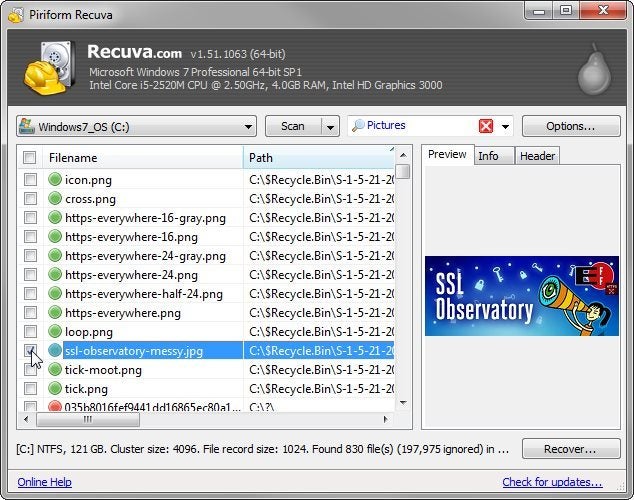
There are several good file recovery programs available. I recommend Recuva Portable. It’s easy to use and has a very good track record. And it sometimes shows you the images that it can recover. (I’ve seen it recover images that it could not preview.) It’s also free.

0505 recuva

And, since it’s portable, which means that you don’t have to install it, you can use it on your PC without writing to the hard drive. Download the program on another computer, and unzip it to a folder on a flash drive. Then plug the flash drive into the PC with the missing files, and run it from there.

Hire a professional

This is the last resort, if none of the above suggestions work. There are many data recovery services available, and since your drive is still working, you probably don’t need one of the more expensive ones.
I’ve never used one of these services, so I can’t recommend a particular company. A PCWorld visit to the nearby DriveSavers shows you what one such company is like. Ask friends for a recommendation, or find someone local on Yelp.